This update patches a filtering issue caused by a recent eBay change, and should restore full functionality to the extension.
Showing posts with label extension. Show all posts
Showing posts with label extension. Show all posts
Wednesday, May 6, 2020
MedBetterBUY 5.1 Chrome extension maintenance update
Version 5.1 of the MedBetterBUY Chrome extension has been released to the Chrome Web Store.

Monday, February 11, 2019
MedBetterWTHAY updated, new popup information window in family tree
MedBetterWTHAY, a Chrome extension for use with the Ancestry site to display extra family information in a popup window, has been updated with a new feature. It now shows a popup window of a person's relationship to you when the cursor is placed, or hovered, over that person's information box on the family tree page.
This option is only available for the top-down or vertical family tree display, and not the sideways or horizontal family tree display. It will activate after one second of hovering the mouse over any family tree entry.
A red line at the top of the box will show when the feature is activated by the mouse hover, and then there is a delay of varying time (less than one to several seconds) while the extension requests and loads the relationship information from the Ancestry site.
The original popup window showing Relationship and LifeStory for Find Person listings continues to operate as before.
I personally use this feature of the MedBetterWTHAY extension when I'm deep in the family tree and start to lose track of exactly who the heck I'm looking at.
Please note, the new family tree relationship is internally a lot more fiddly and fragile than other parts of the extension, or other Ancestry-related extensions. If the Ancestry site changes even a little bit, I would be wholly unsurprised if the change caused this feature to stop working properly. Just let me know and I'll see if I can make it all work again.
This option is only available for the top-down or vertical family tree display, and not the sideways or horizontal family tree display. It will activate after one second of hovering the mouse over any family tree entry.
A red line at the top of the box will show when the feature is activated by the mouse hover, and then there is a delay of varying time (less than one to several seconds) while the extension requests and loads the relationship information from the Ancestry site.
The original popup window showing Relationship and LifeStory for Find Person listings continues to operate as before.
I personally use this feature of the MedBetterWTHAY extension when I'm deep in the family tree and start to lose track of exactly who the heck I'm looking at.
Please note, the new family tree relationship is internally a lot more fiddly and fragile than other parts of the extension, or other Ancestry-related extensions. If the Ancestry site changes even a little bit, I would be wholly unsurprised if the change caused this feature to stop working properly. Just let me know and I'll see if I can make it all work again.
Thursday, January 10, 2019
MedBetterWTHAY updated for Canada, Australia, UK site support
MedBetterWTHAY Chrome browser extension for the Ancestry website has been updated. Version 1.1 adds support for Ancestry sites of Canada, Australia, and the UK.
That is all.
That is all.
Sunday, January 6, 2019
New MedBetterWTHAY Chrome browser extension released
MedBetterWTHAY is a Chrome browser extension for use with the Ancestry website to enhance the Search All People feature available from the Chrome Web Store. It displays a popup window that shows the Relationship (to you) and LifeStory of a person when the cursor is placed, or hovered, over that person's Search entry. This can be useful, for example, to more easily determine people who have a family tree entry, but are not attached to your main family tree, also known as orphans or islands.
Install the extension and navigate to your family tree page, select Find Person and List of All People from the right dropdown menu. From this page, or a specific search on this page, hover the cursor over any person's name whom you are interested in seeing further information. After two seconds, you will see a red line appear under their name. This indicates the extension is loading information from the Ancestry website. When the information is retrieved, a popup window containing the Relationship and Lifestory is displayed.
Some entries may have a blank LifeStory if there is no information on record, but all entries should have a Relationship if they are connected to the main family tree. If you see a blank Relationship, this is a strong indication that the entry is an unattached "island" and can either be removed, or possibly reconnected, to the main tree.
Verify that the entry is truly unattached by clicking the person's listing link to see the their information before deleting them. An entry with no relationship to you listed below their name means that they have no or an unknown connection to your family tree.
I have personally used MedBetterWTHAY to detect and remove over 200 people, as well as over two dozen multi-person subtrees not attached to the main tree. Prior to the extension popup, I needed to click each person's entry and view their information page to check their relationship to my family tree.
Of course, this is not the only purpose for the extension. You may also use it to quickly view more information about a person in the Search listing that you are interested in or curious about.
Please note that while the two second delay before the red line is always present (to avoid constantly loading pages as you move the cursor about the page), the time after that is purely dependent on the time spent loading the information from the site. If you have a slow connection, or the Ancestry server is bogged down or otherwise acting like a slug, it may take a while to view the information. At worst case here (so far), I have seen delays of around five seconds to retrieve information when the Ancestry server is engaged in other tasks of vital importance.


Install the extension and navigate to your family tree page, select Find Person and List of All People from the right dropdown menu. From this page, or a specific search on this page, hover the cursor over any person's name whom you are interested in seeing further information. After two seconds, you will see a red line appear under their name. This indicates the extension is loading information from the Ancestry website. When the information is retrieved, a popup window containing the Relationship and Lifestory is displayed.
Some entries may have a blank LifeStory if there is no information on record, but all entries should have a Relationship if they are connected to the main family tree. If you see a blank Relationship, this is a strong indication that the entry is an unattached "island" and can either be removed, or possibly reconnected, to the main tree.
Verify that the entry is truly unattached by clicking the person's listing link to see the their information before deleting them. An entry with no relationship to you listed below their name means that they have no or an unknown connection to your family tree.
I have personally used MedBetterWTHAY to detect and remove over 200 people, as well as over two dozen multi-person subtrees not attached to the main tree. Prior to the extension popup, I needed to click each person's entry and view their information page to check their relationship to my family tree.
Of course, this is not the only purpose for the extension. You may also use it to quickly view more information about a person in the Search listing that you are interested in or curious about.
Please note that while the two second delay before the red line is always present (to avoid constantly loading pages as you move the cursor about the page), the time after that is purely dependent on the time spent loading the information from the site. If you have a slow connection, or the Ancestry server is bogged down or otherwise acting like a slug, it may take a while to view the information. At worst case here (so far), I have seen delays of around five seconds to retrieve information when the Ancestry server is engaged in other tasks of vital importance.


Wednesday, October 3, 2018
MedBetterBuy version 1.2 update
MedBetterBuy version 1.2 update is available, a Chrome browser extension for use with eBay.
This version fixes an incompatibility with a recent eBay site change which caused the rating count and percentage filtering for sellers to fail.
This version fixes an incompatibility with a recent eBay site change which caused the rating count and percentage filtering for sellers to fail.
Tuesday, May 15, 2018
MedBetterBuy, new Chrome extension for eBay to filter listings by Seller rating and info
The new Chrome browser extension MedBetterBuy version 1.0 has been uploaded and is available for download from the Chrome Web Store.
MedBetterBuy is designed for eBay users who want greater control over their search results. The extension filters eBay searches to hide item entries from sellers who have a feedback score or rating percentage below or above values you specify, as well as the ability to filter out Top-rated sellers.
IMPORTANT: To use this script, check the Seller Information box in Show details of View Customize, which will display seller information in listings. Choose List View and not Gallery View. Otherwise, the information to filter will not be available, and MedBetterBuy will not work.
MedBetterBuy works via the context menu, generally accessed through right click or control-click of the mouse. There are five possible filters to apply to search listing from the menu: if a listing is from a top seller, a minimum and maximum rating percentage for the seller in a listing, and a minimum and maximum rating count for the seller in a listing.
The values for minimum and maximum can be set at the Configure options pages, which is the last selection on MedBetterBuy's context menu. Each filter can be checked on and off from the context menu. The current total of filtered out (not visible) listing is shown on the first line of the context menu.
Always refresh or reload the results page listing after changing a value, or checking and unchecking a filter. Although the page can dynamically change, the filter count and previously hidden entries may not properly update without a page refresh.
This extension has been tested with registered and unregistered use of USA's ebay.com. Other country sites currently use different internal website patterns. Support for more countries may be added later, based on user requests and feedback, as well as the effort to include more patterns.
For the contrary-minded, there is no prohibition or check against choosing values which will hide all unsponsored items in a listing, e.g. a Rating Score of greater than 100 will filter out all entries, as will a minimum count higher than the maximum. Zero values are ignored and treated as not active/checked.
Note that eBay can update–and have previously updated–their sites' structure in ways which cause the extension to fail, as it depends on a predictable internal pattern. Please report if MedBetterBuy fails after a site update, so it can be revised to work with eBay's modified website structure, if feasible.
MedBetterBuy is based on the abef (A Better eBay Filter) Greasemonkey script that I developed and first released several years ago.
(because all the good names were already taken)
Screenshots:


MedBetterBuy is designed for eBay users who want greater control over their search results. The extension filters eBay searches to hide item entries from sellers who have a feedback score or rating percentage below or above values you specify, as well as the ability to filter out Top-rated sellers.
IMPORTANT: To use this script, check the Seller Information box in Show details of View Customize, which will display seller information in listings. Choose List View and not Gallery View. Otherwise, the information to filter will not be available, and MedBetterBuy will not work.
MedBetterBuy works via the context menu, generally accessed through right click or control-click of the mouse. There are five possible filters to apply to search listing from the menu: if a listing is from a top seller, a minimum and maximum rating percentage for the seller in a listing, and a minimum and maximum rating count for the seller in a listing.
The values for minimum and maximum can be set at the Configure options pages, which is the last selection on MedBetterBuy's context menu. Each filter can be checked on and off from the context menu. The current total of filtered out (not visible) listing is shown on the first line of the context menu.
Always refresh or reload the results page listing after changing a value, or checking and unchecking a filter. Although the page can dynamically change, the filter count and previously hidden entries may not properly update without a page refresh.
This extension has been tested with registered and unregistered use of USA's ebay.com. Other country sites currently use different internal website patterns. Support for more countries may be added later, based on user requests and feedback, as well as the effort to include more patterns.
For the contrary-minded, there is no prohibition or check against choosing values which will hide all unsponsored items in a listing, e.g. a Rating Score of greater than 100 will filter out all entries, as will a minimum count higher than the maximum. Zero values are ignored and treated as not active/checked.
Note that eBay can update–and have previously updated–their sites' structure in ways which cause the extension to fail, as it depends on a predictable internal pattern. Please report if MedBetterBuy fails after a site update, so it can be revised to work with eBay's modified website structure, if feasible.
MedBetterBuy is based on the abef (A Better eBay Filter) Greasemonkey script that I developed and first released several years ago.
(because all the good names were already taken)
Screenshots:


Sunday, January 21, 2018
MedBetterDNA 2.2 update
MedBetterDNA has been updated to version 2.2.
Version 2.2 is a fairly minor revision. It allows using filters on Shared Matches pages for a specific member with matching DNA.
This was accomplished by making the pattern for several address links less restrictive. Fortunately, the extension continues to work on the new pages, though it was not originally designed for them.
Leave a note if you have any questions or feedback. Thank you.
Version 2.2 is a fairly minor revision. It allows using filters on Shared Matches pages for a specific member with matching DNA.
This was accomplished by making the pattern for several address links less restrictive. Fortunately, the extension continues to work on the new pages, though it was not originally designed for them.
Leave a note if you have any questions or feedback. Thank you.
Saturday, January 13, 2018
MedBetterDNA bugfix and minor enhancement update
The MedBetterDNA Chrome extension for use with the AncestryDNA site has been updated to version 2.1 from the Chrome Web Store.
Version 2.1 has two bug-fixes for uppercase tags and remove-all entries without notes, and increases by one the show-only and remove-all hashtag filtering matches.
Specifically, in the previous version, uppercase hashtag filters did not match any notes, although notes tags were properly considered case-insensitive for matches. Also, if a Remove-all hashtag filter was active, previously any entries without notes were also filtered from view. Both issues have been corrected.
In addition, support for a fourth hashtag filter was added to both Show-only and Remove-all options. There will be a definite upper limit on the count for performance and display reasons, but judging by recent user feedback, we haven't hit the sweet spot yet.
Note: Chrome can get its context menu checkmarks for hashtag filters out of sync when set from the configuration menu page even after refresh. This appears to be a bug in Chrome. i.e. the context menu checkmark is explicitly set to off (false), verified as off in the program, and acts as if it is off, but still shows up. Clicking it on the context menu will get it back in sync. Yes, it is annoying.
As far as a requested clear all filters feature, I tried implementing it, but due to the above problem leaving not-active checkmarks littering the context menu, I left it out to avoid confused people sending many technical support requests. Besides the configure menu, a quick way to turn off or update multiple filters without getting refreshes on each one is to temporarily turn off the notes display, thereby inhibiting any filtering action, while you click on or off the desired filters, before reactivating the notes display.
And finally, a couple of general expository remarks that you can skip and done if you're not interested.
First, MedBetterDNA enhancements are driven by user feedback. It already does what I want it to do. If you want something new or better, please ask for it. And please understand that it may happen soon, not for a while, or never, for any of a variety of reasons.
Second, if you like the program and are feeling benevolent, please consider rating it 4 or 5 stars. A single one-star drive-by screw-you rating can pull anything less than three other 5-star ratings down below a 4-star average. I don't have any vanity about the extension's rating, and it certainly doesn't affect income at effectively zero dollars received, but many newcomers are leery of trying out lower-rated extensions.
So why might you care about an overall rating if it works for you? Because the more users who are giving active feedback, the more likely I will invest my limited free time in enhancing or fixing the code, or figuring out how to implement any cool ideas that users come up with. Given that I have put in excess of 100 hours of work to the extension already, a bombed-out rating is not a strong motivator for further effort. But if you don't feel like giving a rating, or feel a 1-3 star rating is warranted, that's fine too.
Version 2.1 has two bug-fixes for uppercase tags and remove-all entries without notes, and increases by one the show-only and remove-all hashtag filtering matches.
Specifically, in the previous version, uppercase hashtag filters did not match any notes, although notes tags were properly considered case-insensitive for matches. Also, if a Remove-all hashtag filter was active, previously any entries without notes were also filtered from view. Both issues have been corrected.
In addition, support for a fourth hashtag filter was added to both Show-only and Remove-all options. There will be a definite upper limit on the count for performance and display reasons, but judging by recent user feedback, we haven't hit the sweet spot yet.
Note: Chrome can get its context menu checkmarks for hashtag filters out of sync when set from the configuration menu page even after refresh. This appears to be a bug in Chrome. i.e. the context menu checkmark is explicitly set to off (false), verified as off in the program, and acts as if it is off, but still shows up. Clicking it on the context menu will get it back in sync. Yes, it is annoying.
As far as a requested clear all filters feature, I tried implementing it, but due to the above problem leaving not-active checkmarks littering the context menu, I left it out to avoid confused people sending many technical support requests. Besides the configure menu, a quick way to turn off or update multiple filters without getting refreshes on each one is to temporarily turn off the notes display, thereby inhibiting any filtering action, while you click on or off the desired filters, before reactivating the notes display.
And finally, a couple of general expository remarks that you can skip and done if you're not interested.
First, MedBetterDNA enhancements are driven by user feedback. It already does what I want it to do. If you want something new or better, please ask for it. And please understand that it may happen soon, not for a while, or never, for any of a variety of reasons.
Second, if you like the program and are feeling benevolent, please consider rating it 4 or 5 stars. A single one-star drive-by screw-you rating can pull anything less than three other 5-star ratings down below a 4-star average. I don't have any vanity about the extension's rating, and it certainly doesn't affect income at effectively zero dollars received, but many newcomers are leery of trying out lower-rated extensions.
So why might you care about an overall rating if it works for you? Because the more users who are giving active feedback, the more likely I will invest my limited free time in enhancing or fixing the code, or figuring out how to implement any cool ideas that users come up with. Given that I have put in excess of 100 hours of work to the extension already, a bombed-out rating is not a strong motivator for further effort. But if you don't feel like giving a rating, or feel a 1-3 star rating is warranted, that's fine too.
Tuesday, January 2, 2018
MedBetterDNA for AncestryDNA updated to version 1.4
Version 1.4 of the MedBetterDNA Chrome extension for the AncestryDNA site has been published to the Chrome Web Store and should be soon or already available for download and update.
This version adds support for three additional countries besides the USA site, the Australian .com.au, UK .co.uk, and Canadian .ca Ancestry sites.
A full description of the extension's capabilities can be found in the post on its initial release. All subsequent releases have addressed incompatibilities or fixes with operations.
This version adds support for three additional countries besides the USA site, the Australian .com.au, UK .co.uk, and Canadian .ca Ancestry sites.
A full description of the extension's capabilities can be found in the post on its initial release. All subsequent releases have addressed incompatibilities or fixes with operations.
Wednesday, July 5, 2017
MedBetterDNA Chrome extension updated to version 1.3
The MedBetterDNA Chrome extension has been updated to version 1.3 to fix a couple of serious problems with the current Ancestry DNA site. MedBetterDNA provides advanced filtering capability for relationships based on confidence and family tree status, as well permanently showing user notes on Ancestry DNA results pages. MedBetterDNA was tested as working on July 5, 2017.
Version 1.3 fixes a recent incompatibility with the DNA site that was blocking the context menu display, and changes the way filters are processed to support differences in the site's web page processing, particularly on initial entry. Please remember, this extension is heavily dependent on website structures that are subject to change outside of the extension's control. When the website is significantly modified, as companies typically do on occasion, the extension will fail until it is updated with the new structure. Reporting a problem to support is the best and quickest remedy.
Version 1.3 fixes a recent incompatibility with the DNA site that was blocking the context menu display, and changes the way filters are processed to support differences in the site's web page processing, particularly on initial entry. Please remember, this extension is heavily dependent on website structures that are subject to change outside of the extension's control. When the website is significantly modified, as companies typically do on occasion, the extension will fail until it is updated with the new structure. Reporting a problem to support is the best and quickest remedy.
Monday, May 29, 2017
WikSort Chrome extension for English Wikipedia updated.
WikSort was updated to version 4.0 and is available for automatic or manual updating in the Chrome Web Store. Version 4.0 corrects compatibility problems with more recent versions of Chrome, and has a few improved appearance tweaks.
WikSort is a Chrome extension that sorts unique words in an Engliash Wikipedia article to a new tab. All words over five characters are alphabetically listed in a text box of the new page, with each entry followed by the usage count in the article. WikSort is useful when editing Wikipedia with Chrome because Chrome's spell checker can help quickly locate misspelled words and inconsistent spelling in an article from the word list generated.
The minimum number of characters in the word list can be changed via the extension options, ranging from 3 to 10. The font size of the word list can also be modified in extension options, from 25% to 400% of normal.

WikSort is a Chrome extension that sorts unique words in an Engliash Wikipedia article to a new tab. All words over five characters are alphabetically listed in a text box of the new page, with each entry followed by the usage count in the article. WikSort is useful when editing Wikipedia with Chrome because Chrome's spell checker can help quickly locate misspelled words and inconsistent spelling in an article from the word list generated.
The minimum number of characters in the word list can be changed via the extension options, ranging from 3 to 10. The font size of the word list can also be modified in extension options, from 25% to 400% of normal.

Saturday, May 28, 2016
Updated MedBetterDNA Chrome Extension for AncestryDNA site
The MedBetterDNA Chrome Extension for AncestryDNA has been updated to version 1.1.
Version 1.1 fixes a bug where note text could appear twice, where note text would not show if all other combinations were checked, and fixes a cosmetic wording issue on the context menu.
Please post any questions, comments, or suggestions for a future update.
Thursday, April 7, 2016
New Chrome Extension enhances DNA match experience for Ancestry site
New free Chrome extension MedBetterDNA available in Chrome Web Store:
MedBetterDNA can help people who have taken the AncestryDNA Test. The MedBetterDNA extension enhances the AncestryDNA Results website experience by adding more filtering options for the (possibly many thousands) of other people who are listed as potential DNA matches.
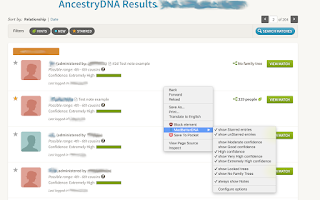
After installation, MedBetterDNA adds an entry for itself to the context menu (right mouse click). When your browser is at an http://dna.ancestry.com/matches address, the context menu selection shows the following checkbox choices:
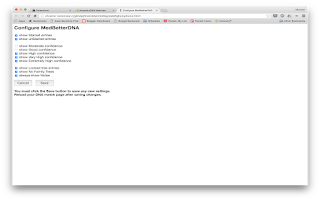
In addition, MedBetterDNA has a stand-alone configure page to set the checkmark options if you cannot or do not wish to use the context menu. This is accessed from the Options links of MedBetterDNA on the Extension page of the Chrome browser.
By default, all options are checked except "always show Notes". When a checkmark is unchecked, all entries that match that condition are hidden from view. Note that it is perfectly possible to uncheck combinations which will hide all entries, e.g. uncheck both "show Starred entries" and "show unStarred entries".
If the "always show Notes" option is checked, all existing notes for DNA match entries will show on the main listing page simultaneously, without having to click on each note to see them one at a time.
Because of the dynamic nature of the results, which can be updated multiple times while a listing is being displayed, occasionally a result may sneak past MedBetterDNA's filters. Currently this has only rarely been seen with entries that have locked family trees with the "show Locked trees" option unchecked. If this occurs, simply refresh or reload the page, and the filtering should pick up the errant listing(s).
Note that the filtering process depends on a particular web configuration and if that changes in the future, MedBetterDNA's will probably not work correctly. Please notify support if the extension fails after having worked previously so we know to make any necessary changes. This is a first version release and may behave accordingly. All trademarks and registered trademarks are the property of their respective owners.
Please post any questions or suggestions for the extension here.
MedBetterDNA can help people who have taken the AncestryDNA Test. The MedBetterDNA extension enhances the AncestryDNA Results website experience by adding more filtering options for the (possibly many thousands) of other people who are listed as potential DNA matches.
After installation, MedBetterDNA adds an entry for itself to the context menu (right mouse click). When your browser is at an http://dna.ancestry.com/matches address, the context menu selection shows the following checkbox choices:
- show Starred entries
- show unStarred entries
- show Moderate confidence
- show Good confidence
- show High confidence
- show Very High confidence
- show Extremely High confidence
- show Locked trees
- show No Family Trees
- always show Notes
- Configure options
In addition, MedBetterDNA has a stand-alone configure page to set the checkmark options if you cannot or do not wish to use the context menu. This is accessed from the Options links of MedBetterDNA on the Extension page of the Chrome browser.
By default, all options are checked except "always show Notes". When a checkmark is unchecked, all entries that match that condition are hidden from view. Note that it is perfectly possible to uncheck combinations which will hide all entries, e.g. uncheck both "show Starred entries" and "show unStarred entries".
If the "always show Notes" option is checked, all existing notes for DNA match entries will show on the main listing page simultaneously, without having to click on each note to see them one at a time.
Because of the dynamic nature of the results, which can be updated multiple times while a listing is being displayed, occasionally a result may sneak past MedBetterDNA's filters. Currently this has only rarely been seen with entries that have locked family trees with the "show Locked trees" option unchecked. If this occurs, simply refresh or reload the page, and the filtering should pick up the errant listing(s).
Note that the filtering process depends on a particular web configuration and if that changes in the future, MedBetterDNA's will probably not work correctly. Please notify support if the extension fails after having worked previously so we know to make any necessary changes. This is a first version release and may behave accordingly. All trademarks and registered trademarks are the property of their respective owners.


Please post any questions or suggestions for the extension here.
Sunday, September 14, 2014
Nancy, a Chrome browser extension for Metafilter
Nancy is a Chrome browser extension for use with Metafilter that can be downloaded from the Chrome Web Store at https://chrome.google.com/webstore/detail/nancy/imecdfomlajaibcoifhehollkfcgjgib. Nancy allows filtering Metafilter posts and comments from view. You can choose to filter posts and comment, only posts, only comments, or show everything. A filter can be triggered by text in a post, the Metafilter user who made the post or comment, or a link within the post or comment. It works for both registered and unregistered (or not logged in) Metafilter users. Nancy is based on the diediedead Greasemonkey script, although it differs somewhat in actual operation.
There are two methods to use Nancy with Metafilter. First, you can use the context menu (right-click) to select what to filter, how to filter, and to go the configure menu. Or you can go directly to the configure menu by selecting Settings in Chrome, choosing Extensions, finding the entry for Nancy, and clicking on Options.
The context menu can be used to quickly create filters and to choose filter actions. If you right click on a user in a post or comment, Nancy's context menu will have an entry Filter for user which, when selected, adds a filter for that user. If you highlight text, the context menu will show Filter for text <selected text>. Right click on a link to Filter for base link (e.g. "www.example.com/extra?stuff" will add a filter for any link that matches "www.example.com".
Within the options page itself, place users whose posts you want filtered in the filter users text box, the text of posts you want filtered in the second text box, and posts containing sites you want filtered in the third box. Note that the user name must be an exact match. Text filters are are not case sensitive and considered to be a whole word or set of words, e.g. "cow" will not match "cows", but "BIG COWS" will match "big cows". Sites match any part of a link.
To turn off all filters, choose Show all content. If filters should apply to both posts and comments to posts, choose Filter posts and comments, otherwise choose filters only or posts only.
If you have questions about using the extension, post them here.


There are two methods to use Nancy with Metafilter. First, you can use the context menu (right-click) to select what to filter, how to filter, and to go the configure menu. Or you can go directly to the configure menu by selecting Settings in Chrome, choosing Extensions, finding the entry for Nancy, and clicking on Options.
The context menu can be used to quickly create filters and to choose filter actions. If you right click on a user in a post or comment, Nancy's context menu will have an entry Filter for user which, when selected, adds a filter for that user. If you highlight text, the context menu will show Filter for text <selected text>. Right click on a link to Filter for base link (e.g. "www.example.com/extra?stuff" will add a filter for any link that matches "www.example.com".
Within the options page itself, place users whose posts you want filtered in the filter users text box, the text of posts you want filtered in the second text box, and posts containing sites you want filtered in the third box. Note that the user name must be an exact match. Text filters are are not case sensitive and considered to be a whole word or set of words, e.g. "cow" will not match "cows", but "BIG COWS" will match "big cows". Sites match any part of a link.
To turn off all filters, choose Show all content. If filters should apply to both posts and comments to posts, choose Filter posts and comments, otherwise choose filters only or posts only.
If you have questions about using the extension, post them here.


Monday, August 4, 2014
WikSort Chrome extension update
Version 3.5 of WikSort, a Chrome browser extension for use with Wikipedia, is available in the Chrome Web Store. The update adds support for common contractions (e.g. didn't) and supports sorting for articles which were displayed via a redirect (e.g. cattle from cow).
Friday, February 21, 2014
Wikipedia tool WikSort extension for Chrome released
Newly published to the Chrome Web Store is the WikSort extension. The direct link is https://chrome.google.com/webstore/detail/wiksort/pideoflnjbdpblpbgdibonfnjnjljbli?hl=en&gl=US
WikSort is a Chrome extension that sorts unique words in a Wikipedia article to a new tab. All words over six characters are alphabetically listed in a text box of the new page, with each entry followed by the usage count in the article. WikSort is useful when editing Wikipedia with Chrome because Chrome's spell checker can help quickly locate misspelled words and inconsistent spelling in an article from the word list generated.
Once installed, the script will add a dark red "W" icon on the far right of the address bar for any Wikipedia article address. Click the icon to generate a sorted word list. After a short delay while the page information is loaded and processed, the word list should display in a new tab.
The minimum number of characters in the word list can be changed via the extension options, ranging from 3 to 10. The font size of the word list can also be modified in extension options, from 25% to 300% of normal.
WikSort is an enhanced version of the older wikSort Greasemonkey and Wikipedia user scripts that I had previously released. It only works with the English (en.wikipedia.org) version of Wikipedia, but additional language versions of WikSort should be fairly easy to create by user request.
Please comment here if you have any questions about the WikSort extension for Chrome.
WikSort is a Chrome extension that sorts unique words in a Wikipedia article to a new tab. All words over six characters are alphabetically listed in a text box of the new page, with each entry followed by the usage count in the article. WikSort is useful when editing Wikipedia with Chrome because Chrome's spell checker can help quickly locate misspelled words and inconsistent spelling in an article from the word list generated.
Once installed, the script will add a dark red "W" icon on the far right of the address bar for any Wikipedia article address. Click the icon to generate a sorted word list. After a short delay while the page information is loaded and processed, the word list should display in a new tab.
The minimum number of characters in the word list can be changed via the extension options, ranging from 3 to 10. The font size of the word list can also be modified in extension options, from 25% to 300% of normal.
WikSort is an enhanced version of the older wikSort Greasemonkey and Wikipedia user scripts that I had previously released. It only works with the English (en.wikipedia.org) version of Wikipedia, but additional language versions of WikSort should be fairly easy to create by user request.
Please comment here if you have any questions about the WikSort extension for Chrome.
Subscribe to:
Posts (Atom)